
Lunar Navigation Control Experiment Instructions
Please carefully read the instructions below.
In this experiment, you will be playing a simple game where you try to land a spacecraft between two yellow flags. The computer knows how to perform this task, and at certain points, will provide you demonstrations of how to land the spacecraft and ask you to practice in order to help you improve at the task.NOTE: You must be on a laptop or computer to participate. Additionally, it is important that you do NOT refresh or close the page during the experiment.
The game interface is shown below.
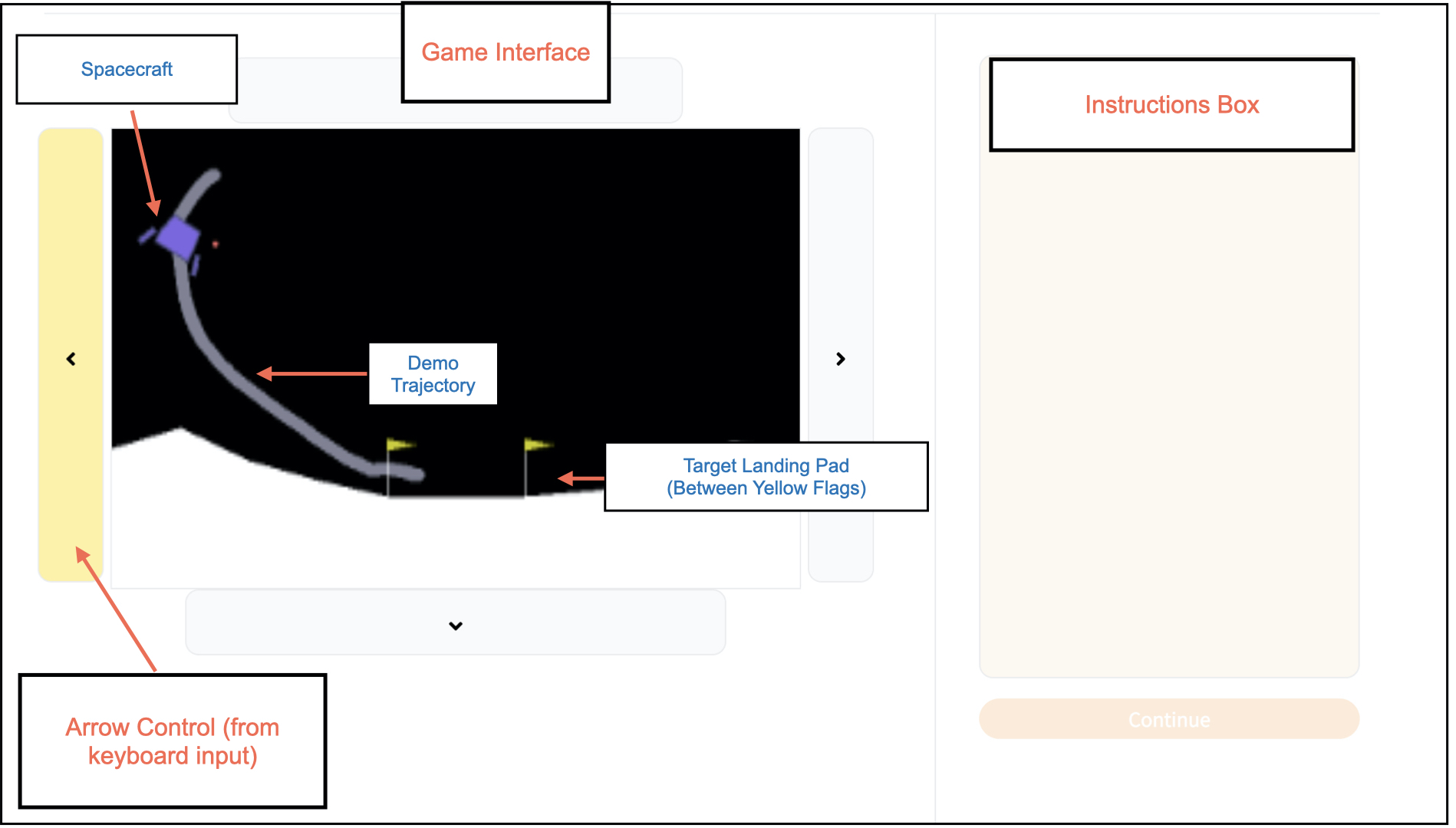
The goal of the game is to land the spacecraft in the landing pad (between the two yellow flags). The spacecraft will fire its engine opposite to the direction of the arrow key you pressed. To control the spacecraft, you can use the four arrow keys on your keyboard: up, down, left, and right. When a key is pressed, the corresponding arrow in the game interface will be highlighted (see image above). For example, pressing the left arrow causes the spacecraft's right engine to fire (shown by red dots), providing a force to the left.
The experiment consists of three phases.
Phase I: In Phase I, you will have a pre-test with two chances to try landing the spacecraft from start to finish. Use your arrow keys to control the spacecraft.
Phase II: In Phase II, you will practice landing the spacecraft after watching a demonstration 3 times. You will alternate between watching the computer land the spacecraft (Demonstration), and practicing landing the spacecraft yourself (Practice). The following two paragraphs give more details on Phase II.
— Demonstration.
During demonstrations, you will watch a video of how the computer lands the spacecraft.
To help you understand how the computer is controlling the spacecraft,
the control keys on the interface will be highlighted based on the key the computer chooses, and the spacecraft will respond accordingly.
The trajectory the spacecraft is following is shown in light gray.
You should not touch any controls during these demonstrations.
—Practice.
During practice, you will have a chance to practice landing the spacecraft, following the demonstration provided by the computer.
To control the spacecraft, you should use the four arrow keys on your keyboard.
The corresponding arrow on the interface will move accordingly, as it did during the demonstration.
The trajectory the spacecraft should follow from the demo is shown in light gray.
Phase III: In Phase III, you will try to land the spacecraft from start to finish. Phase III has five rounds. Use the arrow keys on your keyboard to control the spacecraft.
- What does Phase II consist of?
- How and when should you control the spacecraft?
Complete the following quiz to get started.